
Rich Snippet Optimizer & Schema Validator
Optimize your Google snippet, validate structured data, and boost your chances of earning rich results in search.
- i Start typing to get SEO recommendations
🎯 Rich Snippet Score Analyzer
- 📐 Title length (50–60 chars)+0 / 15
- 📝 Meta length (140–160 chars)+0 / 15
- 🔑 Keyword in title+0 / 15
- 🎯 Keyword in meta+0 / 15
- 📋 Schema markup added+0 / 15
- ✅ Valid JSON-LD+0 / 10
- ❓ FAQ present+0 / 10
- 📄 Content 800+ words+0 / 5
- i Click "Recheck Score" or fill in the fields above
0.4
Rich Snippet Previewer & Schema Validator
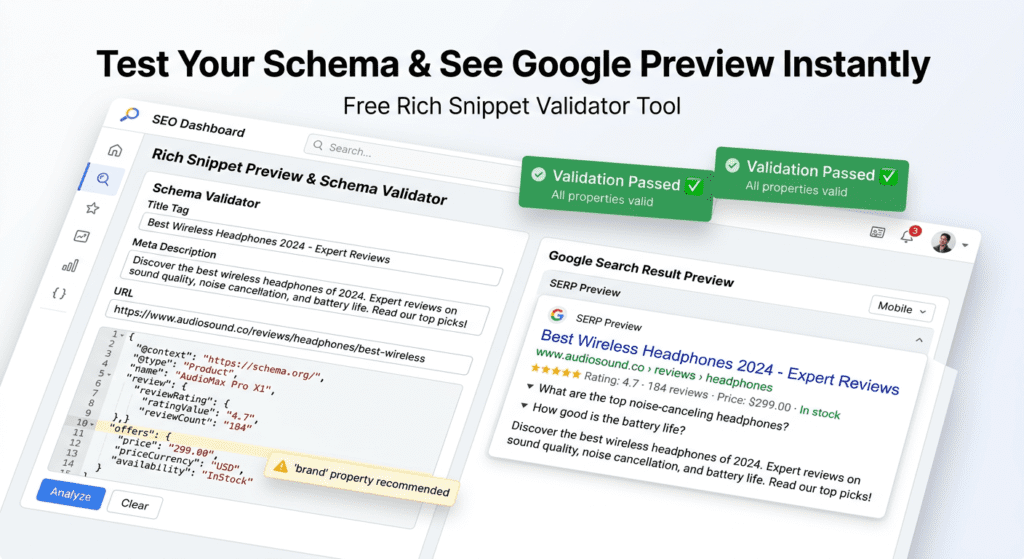
🚀 What is a Google Rich Snippet Validator & Schema Preview Tool?
This free Google rich snippet validator and schema preview tool helps you instantly test your structured data and see how your page may appear in search results.
With this tool, you can:
- Validate JSON-LD schema markup
- Preview your Google search snippet
- Check for rich snippet errors
- Optimize your content for better CTR and visibility
Whether you are a blogger, SEO expert, or beginner, this rich snippet checker and structured data preview tool makes it easy to test and improve your search appearance before publishing.
🎯 Why Use This Rich Snippet Validator?
Many websites fail to get rich results because:
- Schema markup is incorrect
- Required fields are missing
- Google cannot properly understand the content
Using this schema markup validator and preview tool, you can:
- Fix errors before publishing
- Improve how your page appears in Google
- Increase click-through rate (CTR)
- Test different titles and meta descriptions
👉 This acts as a quick alternative preview tool before using
Google Rich Results Test
and
Google Search Console
🛠️ How to Use the Rich Snippet Preview Tool (Step-by-Step)
Follow these simple steps:
- Enter your Title Tag (main headline in search results)
- Add your Meta Description (short summary below title)
- Enter your URL
- Select your Schema Type (Article, Product, FAQ, LocalBusiness)
- Paste your JSON-LD schema markup
- Click “Preview & Validate”
- Check:
- Rich snippet preview
- Schema validation results
- Fix errors and optimize your snippet
📊 Supported Schema Types
This tool currently supports:
- Article schema
- Product schema
- FAQPage schema
- LocalBusiness schema
(Upcoming: Event, Recipe, Review schema)
⚠️ Why Your Rich Snippets May Not Appear on Google
Even if your schema is valid, Google may not show rich results due to:
- Google does not guarantee rich snippets
- Low website authority
- Poor content quality
- Schema not matching content
- Indexing issues
👉 Always test your final schema using
Google Search Console
🔍 Tool Limitations & Disclaimer
This tool provides a rich snippet preview and basic validation.
- It does NOT guarantee exact Google display
- It does NOT replace Google’s official tools
- It provides an approximate preview for optimization
For final verification, use:
- Google Rich Results Test
- Google Search Console
🔐 Privacy Policy
We respect your privacy.
- No data is stored
- No content is saved
- All processing happens locally in your browser
❓ Frequently Asked Questions (SEO OPTIMIZED)
What is schema markup?
Schema markup (structured data) is code that helps search engines understand your content better and display enhanced results.
What is a rich snippet?
Rich snippets are enhanced search results showing extra information like ratings, FAQs, prices, and more.
How does this rich snippet validator work?
This tool checks your schema markup and generates a preview of how your page may appear in Google search results.
Does schema markup improve SEO ranking?
Schema markup does not directly boost rankings, but it improves visibility and CTR, which can increase traffic.
Why is my rich snippet not showing in Google?
Possible reasons:
- Google chooses not to show it
- Low domain authority
- Schema errors
- Content mismatch
What is JSON-LD schema?
JSON-LD is the recommended format for adding structured data to your website.
Is this tool free?
Yes, this rich snippet checker and schema validator tool is completely free to use.
Read More
- How to Use Member Count Bot on Discord
- What is the Difference Between AI and Generative AI?
- What is the first step to start SEO?
- How to Disable AI on Your Phone
- How to Invest in AI’s Next Phase: A Comprehensive Guide
- What is Gen AI in layman’s terms?
- How to Use AI Bot on Discord Introduction
- How to Request to Go Live on TikTok
- How to Use Probot for Music
- How to Invite Dyno Bot to Discord
- What Does the Green Dot on Snapchat Profiles Mean?
- What is the Difference Between GPT and Claude?
- How to Invite Probot in Discord
- What is the Best Way to Use Claude AI?
- AI Content Generators : Are They the Future of SEO?
- How to Command Probot to Play Music
- The Definitive Guide to AI Productivity Tools: Boost Efficiency and Drive Results
- How to Find a Missing App Icon on Your iPhone
- How Perplexity AI Differs from ChatGPT
- How to Remove Language and Store Name from SEO URLs in WebSphere Commerce 7
Free Ai Tools
- How do I convert a PNG file to BMP?
- Website Speed Checker Tool
- RankVortex – Implies pulling traffic and SEO rankings toward you.
- SEO Word Counter with Character Count
- Trending YouTube Hashtags Generator
- Free Stopwatch and Online Timer Countdown
- Age Calculator Tool
- Password Generator Tool
- Qr Code Generator Free
- AI Story Generator Tool
- Blog Title Generator Tool [FREE]